Articles by "Other"

1 ,
StartIsBack++ 2.8.7 |  2.7.3 | 1.7.6

StartIsBack++ 2.8.7 | 2.7.3 | 1.7.6 Full Activated Versions

Multilingual registered version.

StartIsBack ++ returns in Windows 10 a full-featured Start button for the Start menu, the same as in Windows 7. StartIsBack significantly improves the usability of the desktop and makes the new screen streamlined, most convenient.

Features of the program:
The menu, button and settings are exactly the same as in Windows 7.
A Windows session will always start from the desktop. Unlike other solutions, StartIsBack opens the desktop without delay and flashing Metro interface.
Restores the main menu from Windows 7 with all the usual features: search, drag and drop icons, pinned and recently used applications.
Allows you to resolve the dilemma of the two interfaces in Windows 10, clearly separating them.
Work programs will be on your desktop, and the new Start screen will show only applications from the Windows store.
You can turn the “Start” screen into “Applications” and you will not need to manage both at once.
It is integrated into the system and does not install additional services or programs.
Installation does not require additional utilities and can be done without administrative privileges. The main menu is completely localized to the system language, with the same names as in Windows 7.
Allows you to customize the display and behavior of the Start menu and the Windows 10 interface: skins, button images, active screen corners and much more.


Download StartIsBack ++ 2.8.7 (for Windows 10) (1.24 MB):

Download StartIsBack Plus 1.7.6 (for Windows 8.1) (1.1 MB):

Download StartIsBack ++ 2.7.3 (time-tested for Windows 10) (1.2 MB):

Microsoft Visual C++ 2005-2008-2010 2012-2013-2019 Redistributable Package


Microsoft Visual C++ 2005-2008-2010 2012-2013-2019 Redistributable Packages

Can be installed on a "live" system. When installing, on a "live" system, the following will be installed: 32-bit versions of Microsoft Visual C ++ 2005-2008-2010-2012-2013-2019 Redistributable Package, on 32-bit and 64-bit operating systems. During the installation of the assembly, a previously installed 32-bit version of Microsoft Visual C ++ 2005-2008-2010-2012-2013-2019 Redistributable Package is searched for and removed. By default, the installation of the assembly occurs with the hiding of the MSI stubs (False). Microsoft Visual C ++ 2012 Redistributable will be installed only on operating systems starting with Windows Vista SP 2 and higher. Can be removed from Add or Remove Programs. If Microsoft Visual C ++ installed on your system is not removed, then use the Windows Installer CleanUp utility to remove them.

Installation keys:
/ ShowFalse - displaying MSI stubs (False) in the "Add or Remove Programs" (Works only when installing Microsoft Visual C ++ Redistributable Package). The key is not case sensitive.
/ S — Microsoft Visual C ++ installation 2005-2008-2010-2012-2013-2019 Redistributable Package in a silent version. The key is case-sensitive, and therefore use only / S, not / s. If the key was specified incorrectly or not specified at all, then an installation with the installation indication will occur.
/ WithOutFalse - Microsoft Visual C ++ installation 2005-2008-2010-2013-2019 Redistributable Package without MSI stubs (False). The key is not case sensitive.
/ WithOutVC05 - installation without Microsoft Visual C ++ 2005 Redistributable Package. The key is not case sensitive.
/ WithOutVC08 - installation without Microsoft Visual C ++ 2008 Redistributable Package. The key is not case sensitive.
/ WithOutVC10 - installation without Microsoft Visual C ++ 2010 Redistributable Package. The key is not case sensitive.
/ WithOutVC12 - installation without Microsoft Visual C ++ 2012 Redistributable Package. The key is not case sensitive.
/ WithOutVC13 - installation without Microsoft Visual C ++ 2013 Redistributable Package. The key is not case sensitive.
/ WithOutVC19 - installation without Microsoft Visual C ++ 2019 Redistributable Package. The key is not case sensitive.
/ DisableVssOff - Installing Microsoft Visual C ++ Redistributable Package without shutting down the vss-service. By default, the vss service is disabled to speed up installation. The key is not case sensitive.
/ DisableWuauServStop — Installs Microsoft Visual C ++ Redistributable Package without stopping the wuauserv service. By default, the wuauserv service stops to speed up the installation. The key is not case sensitive.
Additional keys:
/ GetListProg - getting a list of installed programs in the operating system, without the subsequent installation of Microsoft Visual C ++ Redistributable Package. This key is relevant for those who want to see if the MSI stubs (False) are installed. The key is not case sensitive.
/ DelVCAll - uninstall previously installed Microsoft Visual C ++ 2005-2008-2010-2012-2013-2019 Redistributable Package, without subsequent installation of Microsoft Visual C ++ Redistributable Package. The key is not case sensitive.
/ DelVC05 — uninstall previously installed Microsoft Visual C ++ 2005 Redistributable Package, without installing Microsoft Visual C ++ Redistributable Package. The key is not case sensitive.
/ DelVC08 — Uninstall previously installed Microsoft Visual C ++ 2008 Redistributable Package, without installing Microsoft Visual C ++ Redistributable Package. The key is not case sensitive.
/ DelVC10 — uninstall previously installed Microsoft Visual C ++ 2010 Redistributable Package, without installing Microsoft Visual C ++ Redistributable Package. The key is not case sensitive.
/ DelVC12 — uninstall previously installed Microsoft Visual C ++ 2012 Redistributable Package, without installing Microsoft Visual C ++ Redistributable Package. The key is not case sensitive.
/ DelVC13 — uninstall previously installed Microsoft Visual C ++ 2013 Redistributable Package, without installing Microsoft Visual C ++ Redistributable Package. The key is not case sensitive.
/ DelVC15 - removal of previously installed Microsoft Visual C ++ 2015 Redistributable Package, without subsequent installation of Microsoft Visual C ++ Redistributable Package. The key is not case sensitive.
/ DelVC17 — uninstall previously installed Microsoft Visual C ++ 2017 Redistributable Package, without installing Microsoft Visual C ++ Redistributable Package. The key is not case sensitive.
/ UpdateWithWUSA - installing the update using WUSA. By default, the update is installed using DISM on Windows 7 / 8.0 / 8.1 to speed up the installation. It works only when installing Microsoft Visual C ++ 2017 Redistributable Package. The key is not case sensitive.
/ DelVC19 — uninstall previously installed Microsoft Visual C ++ 2019 Redistributable Package, without installing Microsoft Visual C ++ Redistributable Package. The key is not case sensitive.


Visual C++ 2005-2008-2010-2012-2013-2019 Redistributable Package x86 (24,6 МБ): 


Visual C++ 2005-2008-2010-2012-2013-2019 Redistributable Package x86/x64  


Download GUI installer set VCHyb from nibble74 (0.8 MB):


Premium Accounts For RAPIDGATOR.NET  /MEGAUPLADO.ORG / dizzcloud.com / filesmonster.com / terafile.co / fileparadox.in (October 2014) Full Free Download

Premium Accounts 2014


RAPIDGATOR.NET PREMIUM ACCOUNTS 2014 

MEGAUPLADO.ORG PREMIUM ACCOUNTS 2014 


 dizzcloud.com PREMIUM ACCOUNTS 2014 


filesmonster.com PREMIUM ACCOUNTS 2014 


terafile.co PREMIUM ACCOUNTS 2014 


fileparadox.in PREMIUM ACCOUNTS 2014 


Java JRE 9.0 Build 31 Early Access Full Version Free Download

ava allows you to play online games, chat with people around the world, calculate your mortgage interest, and view images in 3D. These applications, written in the Java programming language and access from your browse, are called “applets”. Corporations also use Java applets for intranet applications and other e-business solutions. Java is used by companies in all major industries. Whether deployed on cell phones, embedded devices, game consoles, laptops, or in datacenters, Java offers the rich user interface, performance, versatility, portability, and security that today’s networked applications require. Java Platform Standard Edition software is the premier platform for rapidly developing and deploying secure, portable applications that run on server and desktop systems spanning most operating systems.

Key features:
• Write software on one platform and run it on practically any other platform
• Create programs to run within a web browser and web services
• Develop server-side applications for online forums, stores, polls, HTML forms processing, and more
• Combine Java technology-based applications or services to create highly customized applications or services
• Write powerful and efficient applications for mobile phones, remote processors, low-cost consumer products, and practically any device with a digital heartbeat
Java is one of the most popular application platforms on the planet. Which version of Java is right for you?
• Java Platform, Standard Edition (Java SE) is the best platform for development of desktop, server and high-end embedded devices, and it is the most versatile runtime for Java as well as many other languages.
• Java Platform, Micro Edition (Java ME) is the best software for resource-constrained embedded devices and has seen widespread deployment across mobile handsets and digital television devices.
• Java Platform, Enterprise Edition (Java EE) is the standard for delivering secure, robust, scalable, multi-platform applications and services across the enterprise, from server and desktop applications to wireless and wireline applications.


VirtualBox 4.3.12 Final + Extension Pack For All Systems Full Version Free Download

VirtualBox - a special program to create a memory PC virtual machines. Each virtual machine can contain an arbitrary set of virtual devices and separate the operating system. Scope of virtual machines is very wide - from performing the functions of software testing to create entire networks, which are easily scaled, load-balance and protect. VirtualBox is free, open source software.

There are versions of VirtualBox, intended to be installed on virtually all operating systems, including Windows, Linux, Macintosh and OpenSolaris. As a "guest" operating system can also be used any operating system including Windows (NT 4.0, 2000, XP, Server 2003, Vista, W7), DOS / Windows 3.x, Linux, and OpenBSD.

Among the main features of the program are the following:VirtualBox can run as a GUI-interface or the command line.
To extend the functions of the program, a special set of SDK.
Parameters of virtual machines are described in XML format and does not depend on the physical computer on which the system works. Therefore, the virtual computer format VirtalBox easily transferred from one PC to another.
When using the "guest" computer operating systems, Windows or Linux, you can use special tools which substantially facilitate switching between the physical and virtual computers.
For a quick exchange of files between the guest and the physical PC, you can create so-called "shared folders" (Shared folders), which are simultaneously accessible from both of these machines.
VirtualBox allows you to connect USB-devices to virtual machines, allowing virtual machines to work with them directly.
VirtualBox fully supports the remote access RDP (Remote Desktop Protocol). A virtual machine can act as RDP-server, allowing you to control it remotely.

Operating System:Windows XP, all service packs (32-bit)
Windows Server 2003 (32-bit)
Windows Vista (32-bit and 64-bit)
Windows Server 2008 (32-bit and 64-bit)
Windows 7 (32-bit and 64-bit)
Windows 8 (32-bit and 64-bit)
Windows Server 2012 (64-bit)

Changelog
VMM: fixed a Guru Meditation on putting Linux guest CPU online if nested paging is disabled 
VMM: invalidate TLB entries even for non-present pages 
GUI: Multi-screen support: fixed a crash on visual-mode change 
GUI: Multi-screen support: disabled guest-screens should now remain disabled on visual-mode change 
GUI: Multi-screen support: handle host/guest screen plugging/unplugging in different visual-modes 
GUI: Multi-screen support: seamless mode: fixed a bug when empty seamless screens were represented by fullscreen windows 
GUI: Multi-screen support: each machine window in multi-screen configuration should have correct menu-bar now (Mac OS X hosts) 
GUI: Multi-screen support: machine window View menu should have correct content in seamless/fullscreen mode now (Mac OS X hosts) 
GUI: VM manager: vertical scroll-bars should be now updated on content/window resize 
GUI: VM settings: fixed crash on machine state-change event 
GUI: don't show warnings about enabled or disabled mouse integration if the VM was restored from a saved state 
Virtio-net: properly announce that the guest has to handle partial TCP checksums (bug #9380) 
Storage: Fixed incorrect alignment of VDI images causing disk size changes when using snapshots (bug #11597) 
Audio: fixed broken ALSA & PulseAudio on some Linux hosts due to invalid symbol resolution (bug #11615) 
PS/2 keyboard: re-apply keyboard repeat delay and rate after a VM was restored from a saved state (bug #10933) 
BIOS: updated DMI processor information table (type 4): corrected L1 & L2 cache table handles 
Timekeeping: fix several issues which can lead to incorrect time, Solaris guests sporadically showed time going briefly back to Jan 1 1970 
Main/Metrics: disk metrics are collected properly when software RAID, symbolic links or rootfs are used on Linux hosts 
VBoxManage: don't stay paused after a snapshot was created and the VM was running before 
VBoxManage: introduced controlvm nicpromisc (bug #11423) 
VBoxManage: don't crash on controlvm guestmemoryballoon if the VM isn't running (bug #11639) 
VBoxHeadless: don't filter guest property events as this would affect all clients (bug #11644) 
Guest control: prevent double CR in the output generated by guest commands and do NLS conversion 
Linux hosts / guests: fixed build errors on Linux 3.5 and newer kernels if the CONFIG_UIDGID_STRICT_TYPE_CHECKS config option is enabled (bug #11664) 
Linux Additions: handle fall-back to VESA driver on RedHat-based guests if vboxvideo cannot be loaded 
Linux Additions: RHEL/OEL/CentOS 6.4 compile fix (bug #11586) 
Linux Additions: Debian Linux kernel 3.2.0-4 (3.2.39) compile fix (bug #11634) 
Linux Additions: added auto-logon support for Linux guests using LightDM as the display manager 
Windows Additions: Support for multimonitor. Dynamic enable/disable of secondary virtual monitors. Support for XPDM/WDDM based guests (bug #6118) 
X11 Additions: support X.Org Server 1.14 (bug #11609)

  • Features:
  • Modularity
  • Virtual machine descriptions in XML
  • Guest Additions for Windows and Linux
  • Shared folders
  • Virtual USB Controllers
  • Remote Desktop Protocol
  • USB over RDP


Download Page | Final - All OS

Download | Windows, 4.3.12 Final

Download | Linux, 4.3.12 Final

Download | Mac, 4.3.10 Final

Download | VirtualBox Extension Pack, 4.3.12 Final, All OS


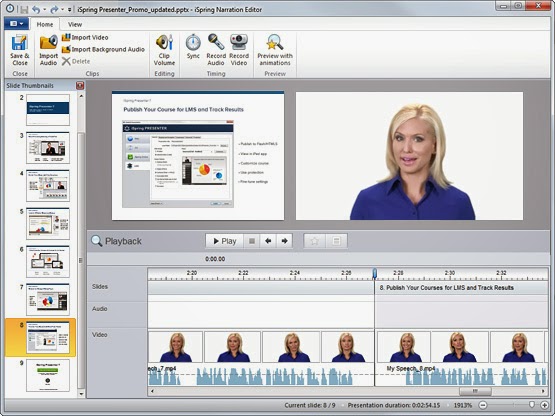
iSpring Presenter 7.0.0 Build 5467 Full Version Free Download

iSpring Presenter 7 is a beautifully engineered piece of software that allows you to create professional mobile-ready presentations and take your authoring to a revolutionary new level. Perfectly Integrated with YourPowerPoint. iSpring Presenter 7 simply adds a tab to the PowerPoint ribbon, and instantly provides you full access to impressive e-Learning features that can swiftly build a complete course or an assessment.


ChrisTV Online Premium Edition 10.15 Multilanguage with Serial Full Version Free Download 

Special program for converting of your computer into a television set and radio receiver. CHRISTV Online! allows to look over the enormous amount of TV-channels, wireless stations and other audio-video material, translated through a network the Internet. For everything it is utillized only connection with the Internet, and it is needed no additional equipment. In the base of the program CHRISTV Online! there are more than 800 televisional channels and more than 600 wireless stations from 100 countries of the world, the list of which brushes up daily.

The choice of channels can be made after a figure, to the type, category, language, name of the station. Favorite tele- and wireless stations it is possible to add to the list favorite channels which will be shown separately in a general list.


Java Runtime Environment 8 Update 5 / 7 Update 55 Full Version Free Download

The Java Runtime Environment (JRE) provides the libraries, the Java Virtual Machine, and other components to run applets and applications written in the Java programming language. In addition, two key deployment technologies are part of the JRE: Java Plug-in, which enables applets to run in popular browsers; and Java Web Start, which deploys standalone applications over a network. Users should install the 32-bit version if they are using 32-bit browsers. If you use both 32-bit and 64-bit browser interchangeably, you need a Java Plug-in for each browser. Hence you will need to install both 32-bit and 64-bit Java respectively.


Adobe AIR 13.0.0.83 Final Offline Installer Full Version Free Download

Adobe AIR, formerly code-named Apollo, is a cross-operating system runtime that allows developers use their existing web development skills in HTML, AJAX, Flash and Flex to build and deploy rich Internet applications to the desktop. Once installed Adobe AIR Applications complement browser-based web applications by providing additional reach and capabilities. The Adobe AIR runtime lets developers use proven web technologies to build rich Internet applications that deploy to the desktop and run across operating systems. Adobe AIR offers an exciting new way to engage customers with innovative, branded desktop applications, without requiring changes to existing technology, people, or processes. With the Adobe AIR runtime, you can deliver branded rich Internet applications on the desktop that give you a closer connection to your customer.

Adobe AIR uses the same proven, cost-effective technologies used to build web applications, so development and deployment is rapid and low risk. You can use your existing web development resources to create engaging, branded applications that run on all major desktop operating systems.
The benefits are extensive. By using Adobe AIR as part of your RIA strategy, you can boost productivity, extend your market reach, enhance customer satisfaction, improve customer retention, lower costs, and increase profits.
Companies like eBay, AOL, and NASDAQ are already using Adobe AIR to deliver engaging RIAs to their users desktops.

With Adobe AIR, you can:
* Establish a more persistent connection with existing customers
* Deliver fully branded experiences with desktop functionality
* Leverage existing personnel, processes, and infrastructure
* Develop and deliver RIAs efficiently using proven Adobe technology
* Increase the ROI of your web investments.


WinRAR 5.10 Beta 2 (x86/x64) With Keygen Full Version Free Download

WinRAR is a powerful archive manager providing complete support for RAR and ZIP archives and is able to unpack CAB, ARJ, LZH, TAR, GZ, ACE, UUE, BZ2, JAR, ISO, 7Z, Z archives. Its RAR format may only take second place for its level of compression – but it is consistently the fastest when it comes to both packing and unpacking files. While RAR files are not native to Windows or Mac, many other compression programs are still capable of unpacking it. WinRAR is available on Windows, OSX, and Linux, despite the name. 

  • WinRAR treats files with .txz extension as .tar.xz archives.
  • If 7-Zip archive extraction is cancelled, WinRAR deletes the incompletely extracted file. Previous versions did not delete it.
Bugs fixed:
  • solid archive updating was aborted for archives contaning BLAKE2 checksums;
  • folder tree panel did not allow to go to the archive root folder;
  • "Reuse existing window" option did not work if first WinRAR copy was browsing an archive and second WinRAR copy attempted to open another archive in another folder;
  • "Advanced compression parameters" dialog settings format in Registry was incompatible with WinRAR 4.20.


Stardock Start8 1.40 DC 04.04.2014 With Patch Full Version Free Download

Microsoft Windows 8 is shipped without the "Start" menu. Stardock heard the cries from Windows 8 users. We put the "Start" menu back in Windows 8. We accurately recreated the most used desktop feature billions of users depend on every day and packed it with additional functionality.

Return the Start Button to Windows 8

Windows 7-style Start menu with Windows 8 enhancements
- Search for Windows 8-style (Modern UI) apps
- Pin desktop and Metro apps to the start menu
- Jump List support
- Unified Search for apps, settings and files
- Boot directly to the Windows 8 desktop
- One click access to shut down, devices, music, documents, and videos


Contact Form

Name

Email *

Message *

Powered by Blogger.
Javascript DisablePlease Enable Javascript To See All Widget