Articles by "OS"

Windows 7 SP1

Windows 7 SP1 with May 2020 Update [7601.24554]


The assembly is based on the original image from MSDN. Updates were integrated on May 12, 2020, and SmartFix 2.2.8 and Microsoft DaRT were integrated. There are no cosmetic changes in it and nothing is cut out.

List of editions available for installation:
- Windows 7 starter x86
- Windows 7 Home Basic x86-x64
- Windows 7 Home Advanced x86-x64
- Windows 7 Professional x86-x64
- Windows 7 Maximum x86-x64
- Windows 7 Enterprise x86-x64


windows 10

Windows 10 v2004 19041.264  with Update May 2020


The assembly is based on the original image from MSDN. Updates were integrated on May 12, 2020, and SmartFix 2.2.8 and Microsoft DaRT were integrated. There are no cosmetic changes in it and nothing is cut out.

List of editions available for installation:
- Windows 10 Home x86-x64
- Windows 10 Pro x86-x64
- Windows 10 Home Single Language x86-x64
- Windows 10 Pro Education x86-x64
- Windows 10 Pro for Workstations x86-x64
- Windows 10 Pro Single Language x86-x64
- Windows 10 Education x86-x64
- Windows 10 Enterprise for Virtual Desktops x86-x64
- Windows 10 Enterprise x86-x64
- Windows 10 IoT Enterprise x86-x64

32-bit [10in1] (3.43 GB)


64-bit [10in1] (4.98 GB)

1

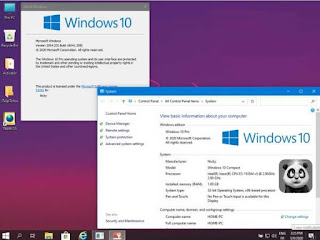
Windows 10 Lite 20H1 x86 Update May 2020

Windows 10 20H1 Compact & Lite x86 is a new Windows 10 installer that is based on Windows 10 20H1 ISO files with various tweaks and special settings that make Windows 10 very light to use and does not require high PC specifications to be able to run it. You can install Windows 10 Lite x86 smoothly on 1 Gb RAM and 1 GHz processor. This is the minimum specification to be able to install Windows 10 Lite x86. So if you have a pc or laptop with more specifications than we mentioned earlier, of course Windows 10 Lite x86 will be able to run very well and lightly on your pc or laptop.

In Windows 10 Lite x86 , of course, you removed some components including cortana, windows defender, one drive, and several other things that you can see in the explanation below later. The appearance of Windows 10 Lite x86 has also been changed a bit to make it look more simple and elegant. Intrigued by the performance of Windows 10 Lite x86? Immediately you download and install Windows 10 Lite x86 right now.

System Requirements

  • Processor: 1 gigahertz (GHz) or faster.
  • RAM: 1 gigabyte (GB).
  • Free space on hard disk: 16 gigabytes (GB).
  • Graphics card: DirectX 9 graphics device or a newer version.
  • Additional requirements to use certain features.

Added

  • Startback
  • 7zip
  • net framework 3.5
  • aio runtime
  • Themes
  • icones

Removes

  • Cortana
  • Microsoft Edge (but you can install edge chromium)
  • Xbox
  • OneDrive
  • Windows Defender
  • Holographic
  • PPIProjection
  • BitLocker
  • Face recognition
  • Windows Hello
  • WinSAT
  • WinRE
  • IME
  • InputMethod
  • Migration
  • Migwiz
  • Tablet PC
  • The WinSxS \ Backup folder is cleared
  • And other

Hash file

  • CRC32: 236989FD
  • MD5: 3AD73B5E2B1FA4C33A1242D1A2A27E56
  • SHA-1: 3B44DC66A8E0C72C45D272D3E6EBCF2278459D2B
Windows 10 Lite 20H1

(1.8 GB)

Windows XP Pro Sp3

Windows XP Pro Sp3 x86 v2020.5.5 Update May 2020


Windows XP Pro Sp3 x86 v2020.5.5 May 2020 is the latest Windows XP Pro Sp3 installer released in 2020. Although, as we all know, Windows XP has not been officially supported by Microsoft since 2014, but there are still some parties who want to provide Microsoft Windows updates to Windows XP. Because as we know, for some people who have PCs with low specs, the best choice is to use Windows XP Pro Sp3 . Therefore we continue to provide the latest Windows XP Pro Sp3 installer in 2020.

Serial: MR49R-DRJXX-M6PX2-V96BF-8CKBJ

Features and highlights of Windows XP Pro SP3:

  • Includes updates provided by Microsoft as of October 27, 2016, in other words Persian date Aban 1395
  • Without altering the Windows registry and content
  • Activation using the Geniune serial without having to crack
  • With Internet Explorer 8, along with all updates
  • Along with the latest SATA drivers to be installed on the laptop

‌This version of Windows XP SP3:

  • Size of less than 700MB Windows and can burn it on a CD and use it.
  • To burn the CD from low speed to use.
  • The latest version of Flash Player is provided at the time of the release of Windows, Windows is installed.
  • Windows Media Player software in the Windows Version 9 is not updated.
  • This version includes the latest updates to Microsoft Windows XP and in this sense - Microsoft's claims - not only an update will add new security updates

System Requirements

  • CPU: Pentium 233-Megahertz (MHz) processor or faster 300 MHz is recommended
  • RAM: At least 64 Megabytes (MB) of RAM (128 MB is recommended)
  • HDD: At least 1.5 gigabytes (GB) of available space on the hard disk
  • CD-ROM or DVD-ROM drive
  • Keyboard and a Microsoft Mouse or some other compatible pointing device
  • Video adapter and monitor with Super VGA (800 x 600) or higher resolution
  • Sound card
  • Speakers or headphones

windows 10

Windows 10 AIO 20h1 v2004.19041.208 AIO En Update May 2020


Windows 10 AIO 20h1 v2004.19041.208 AIO May 2020 is one of the latest Windows 10 operating systems that is still not officially released by Microsoft, but is already in the form of RTM or it can be said that this version is the final version which will be officially released by Microsoft . For those of you who like to try new things, you should try to use Windows 10 AIO 20h1 that the admin shared this time. This is because in it there are several new features that are not included in the final version of Windows 10 that has been circulating.

Windows 10 AIO 20h1 is made based on the original MSDN images and original installer. So here you can install Windows 10 20h1 through the system or through the BIOS. Already impatient with what new features contained in it? Immediately you download and install Windows 10 AIO 20h1 right now.

System Requirements:

  • Processor: 1 gigahertz (GHz) or more.
  • Free space on hard disk: 20 gigabytes (GB).
  • Graphics adapter: Microsoft DirectX 9 or later graphics device.
  • Additional requirements for using some features.
  • To use the touch capabilities, you need a tablet or monitor that supports multisensor technology.
  • To access the Windows Store to download and run applications, an active Internet connection and a screen resolution of at least 1024 × 768 pixels are required.

Features

  • Integrated updates on May 1, 2020.
  • Included .Net Framework 3.5 (including 2.0 and 3.0).
  • Integrated SmartFix 2.2.7, Microsoft DaRT in winre.wim and boot.wim.
  • Systems were not in audit mode.

List of windows editions available for installation:

  • Windows 10 Home x86-x64
  • Windows 10 Home N x86-x64
  • Windows 10 Pro x86-x64
  • Windows 10 Pro N x86-x64
  • Windows 10 Home Single Language x86-x64
  • Windows 10 Pro Education x86-x64
  • Windows 10 Pro N Education x86-x64
  • Windows 10 Pro for Workstations x86-x64
  • Windows 10 Pro N for Workstations x86-x64
  • Windows 10 Pro Single Language x86-x64
  • Windows 10 Education x86-x64
  • Windows 10 Education N x86-x64
  • Windows 10 Enterprise for Virtual Desktops x86-x64
  • Windows 10 Enterprise x86 -x64
  • Windows 10 Enterprise N x86-x64
  • Windows 10 IoT Enterprise x86-x64

File Hases

32 bits

  • CRC32: 0B93EB96
  • MD5: C23AACB8A2B97244A2032D16664E5157
  • SHA-1: 3A8DDFA2B0D56235938D55DF2E398DF1DB2BDBB7

64 bits

  • CRC32: 8E700F39
  • MD5: 8BEB2C6FAF0A232556AC4D0CD0EC7EB4
  • SHA-1: CAB54F45C299C8DF5EEA05A4957FBB7E2DE339C7

windows 10

Windows 10 ISO 20H1 v2004.19041.153 AIO En-Us Update March 2020 


Windows 10 20H1 v2004.19041.153 AIO En-Us Update March 2020 is a Windows 10 installer that has been released in the final release by Microsoft. Because Windows 10 20H1 AIO is the final version, so we can be sure there are no annoying bugs in Windows 10 on this one. Moreover, in it has been integrated with Microsoft's official update until March 2020. In addition, Windows 10 that we share is an AIO version, so you will get all versions of Windows 10 in 1 Windows 10 AIO installer only.

Windows 10 20H1 AIO is not added or reduced in terms of its Windows registry. You also have to activate Windows 10 yourself. But because we have shared many Windows 10 activators that can activate Windows 10 permanently, you don't need to worry anymore about windows activation problems. Please choose your own Windows 10 activator according to your wishes in the activator category in softmenia.

System Requirements:

  • Processor: 1 gigahertz (GHz) or more.
  • Free space on hard disk: 20 gigabytes (GB).
  • Graphics adapter: Microsoft DirectX 9 or later graphics device.
  • Additional requirements for using some features.
  • To use the touch capabilities, you need a tablet or monitor that supports multisensor technology.
  • To access the Windows Store to download and run applications, an active Internet connection and a screen resolution of at least 1024 × 768 pixels are required.

Build Features:

  • Integrated updates on March 13, 2020 (including MSRT and Windows Defender).
  • Included .Net Framework 3.5 (including 2.0 and 3.0).
  • Integrated SmartFix 2.2.6, Microsoft DaRT in winre.wim and boot.wim.
  • Systems were not in audit mode.

List of windows editions available for installation:

  • Windows 10 Home x86-x64
  • Windows 10 Home N x86-x64
  • Windows 10 Pro x86-x64
  • Windows 10 Pro N x86-x64
  • Windows 10 Home Single Language x86-x64
  • Windows 10 Pro Education x86-x64
  • Windows 10 Pro N Education x86-x64
  • Windows 10 Pro for Workstations x86-x64
  • Windows 10 Pro N for Workstations x86-x64
  • Windows 10 Pro Single Language x86-x64
  • Windows 10 Education x86-x64
  • Windows 10 Education N x86-x64
  • Windows 10 Enterprise for Virtual Desktops x86-x64
  • Windows 10 Enterprise x86 -x64
  • Windows 10 Enterprise N x86-x64
  • Windows 10 IoT Enterprise x86-x64

Hash File

32 bits

  • CRC32: F84D9AE3
  • MD5: 4B13AFC82A540CED292374C3C716C253
  • SHA-1: AA9CD007004235797928C5C8F03CD303C0F1F343

64 bits

  • CRC32: BA487046
  • MD5: 0326FC893131429127DDFD2374C47259
  • SHA-1: 6627EECCC3C3E40C34BCAF33E89BF8872EF9AA64

Microsoft Windows and Office ISO Download
Microsoft Windows and Office ISO Download Tool 8.36 Free Download


Microsoft Windows and Office ISO Download Tool is a small, free utility that does not require installation in the system for direct downloading of disk images (ISO) of Windows and Office distributions from Microsoft servers.

There are practically no settings, select the required distribution, the necessary language, and in the next window the required bit depth of the program. The issued download link will be valid for 24 hours. The only limitation when using it is the presence of Internet Explorer 11 and the installed NET Framework 4.6.1. And one more thing, downloading corporate images is not supported.


KMS collection

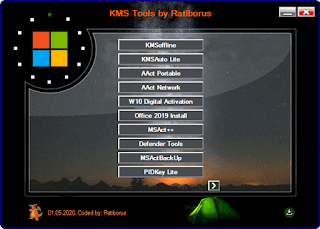
KMS Tools by Ratiborus (KMS/AAct) Free Download


All major programs from Ratiborus to activate XP, Vista, 7, 8, 8.1, 10, Server 2008, 2008 R2, 2012, 2012 R2, Office 2010/2013/2016/2019 in one assembly.

Assembly author - Ratiborus

Composition:
- AAct Network v1.1.8 Portable
- AAct v4.1 Portable
- ConsoleAct v2.8 Portable
- Defender Tools v1.0.6
- Garbage Collector v1.3.7 x86_x64_28_05_2019
- KMSAuto Lite Portable v1.5.6
- KMSAuto Net 2016 v1 .5.4 Portable
- KMSCleaner v2.2 Portable
- KMSoffline v2.1.5 RU EN
- MSAct ++ 2.07.3
- MSActBackUp Portable v1.2.5
- Office 2013-2019 C2R Install v7.05 - UniCrypt 2016 v2.2 - W10 Digital Activation Program v1. 3.7 Portable
- Office Uninstall v1.8.2
- PIDKey Lite v1.64.4 RU EN and more

Rufus

Rufus 3.10.1647 Final Free Download


Latest Rufus is an application that will help you to make a bootable flashdisk easily and quickly. For those of you who want to install Windows via Flasdisk, you can use this software called Rufus. Rufus is one application that is highly recommended to make windows installation from a flash.

Moreover, as we all know, there are many windows that are more than 4 GB in size. This might confuse some of you with installing Windows on your laptop or computer. Because as we all know, regular DVDs are only 4 GB in size, unless you use a dual layer DVD that is up to 8 GB in size. But Dual Layer DVD sellers are currently very few. Therefore the best way to install windows larger than 4 GB is to use a flash drive and make it with this Latest Rufus application .

Here we share the Latest Rufus Full Version, so you can directly use it to create a windows installer on your flashdisk. Please download this Rufus on the link that we have provided below.

What`s new:
  • Improve support for Ubuntu 20.04
  • Improve detection of FIXED drives with no mounted partitions
  • Improve formatting extfs (courtesy of Marcos Mello)
  • UEFI Update: NTFS file system drivers to v1.5
  • Fix progress not being updated when using the German localization
  • Fix primary GPT being overwritten when adding the protective MBR message
  • Fix a regression with lousy security solutions that prevent the creation of an autorun.inf
  • Fix an assert during FreeDOS drive creation when the Windows system locale is set to UTF-8
  • Fix invalid label errors when using a non-Western locale

Related image

Rufus 3.6 Build 1551 Final Free Download

Rufus will be especially useful in cases where:
you need to create a bootable USB disk from a bootable ISO image (Windows, Linux, UEFI, etc.)
need to work on systems that do not have an installed OS
need to flash the BIOS or other firmware from under DOS
need to run low-level utility

Despite its small size, Rufus is able to do everything necessary.

About DOS support:
If you create a DOS boot disk and use a non-US keyboard, Rufus will select a keyboard layout according to the regional settings of your system. In this case, FreeDOS, which is used by default, will be used instead of MS-DOS, since it supports a larger number of keyboard layouts.

About ISO support:
All versions of Rufus starting with version 1.1.0 allow you to create a bootable USB disk from an ISO image (.iso). Creating an ISO image from a physical disk or from a set of files is very easy with CD burning software such as freely distributable CDBurnerXP or ImgBurn.

About UEFI and GPT support:
Starting from version 1.3.2, Rufus supports UEFI, as well as GPT partitions of installation media, which means that Rufus will allow you to install Windows 7, Windows 8 or Linux in full EFI mode. However, full support for UEFI / GPT requires Windows Vista or later versions of Windows. Windows XP restricts the creation of UEFI boot disks to MBR mode due to operating system limitations.

A partial list of ISO images Rufus can work with: Arch Linux, Archbang, BartPE / pebuilder, CentOS, Damn Small Linux, Debian, Fedora, FreeDOS, FreeNAS, Gentoo, GParted, gNewSense, Hiren's Boot CD, LiveXP, Knoppix, KolibriOS , Kubuntu, Linux Mint, NT Password Registry Editor, OpenSUSE, Parted Magic, Partition Wizard, Raspbian, ReactOS, Red Hat, REFInd, Slackware, Super Grub2 Disk, Tails, Trinity Rescue Kit, Ubuntu, Ultimate Boot CD, Windows XP (SP2 + ), Windows Server 2003 R2, Windows Vista, Windows 7, Windows 8, Windows 8.1, Windows 10

Version changes:
• Add support for persistent partitions [EXPERIMENTAL]
• (Note: Ubuntu until Ubuntu bug # 1489855 is properly fixed)
• Add a mode to use VDS when partitioning / formatting (Alt-V) [EXPERIMENTAL]
• Add full extraction support for efi.img (Solus)
• Fix listing of potentially blocking processes
• Fix NTFS not being selectable when using Grub4DOS
• Fix download script.
• Fix translated messages potentially being truncated (e.g. Thai)
• Fix progress bar report for screen readers (Accessibility issue)
• Fix a regression where Windows format prompts would not be suppressed
• Improve (?) Windows To Go support by following Microsoft's recommended partition order
• Don't enumerate Windows Sandbox VHDs
• Disable ISO mode when Manjaro ISOHybrids are being used
• Update embedded GRUB to version 2.04


Rufus 3.6 Build 1551 Final (1 Мb): 


1 ,
StartIsBack++ 2.8.7 |  2.7.3 | 1.7.6

StartIsBack++ 2.8.7 | 2.7.3 | 1.7.6 Full Activated Versions

Multilingual registered version.

StartIsBack ++ returns in Windows 10 a full-featured Start button for the Start menu, the same as in Windows 7. StartIsBack significantly improves the usability of the desktop and makes the new screen streamlined, most convenient.

Features of the program:
The menu, button and settings are exactly the same as in Windows 7.
A Windows session will always start from the desktop. Unlike other solutions, StartIsBack opens the desktop without delay and flashing Metro interface.
Restores the main menu from Windows 7 with all the usual features: search, drag and drop icons, pinned and recently used applications.
Allows you to resolve the dilemma of the two interfaces in Windows 10, clearly separating them.
Work programs will be on your desktop, and the new Start screen will show only applications from the Windows store.
You can turn the “Start” screen into “Applications” and you will not need to manage both at once.
It is integrated into the system and does not install additional services or programs.
Installation does not require additional utilities and can be done without administrative privileges. The main menu is completely localized to the system language, with the same names as in Windows 7.
Allows you to customize the display and behavior of the Start menu and the Windows 10 interface: skins, button images, active screen corners and much more.


Download StartIsBack ++ 2.8.7 (for Windows 10) (1.24 MB):

Download StartIsBack Plus 1.7.6 (for Windows 8.1) (1.1 MB):

Download StartIsBack ++ 2.7.3 (time-tested for Windows 10) (1.2 MB):

Contact Form

Name

Email *

Message *

Powered by Blogger.
Javascript DisablePlease Enable Javascript To See All Widget